How do I change text justification?
With the change to Superblog 2.0 I really miss being able to select text justification. I don't like all text being forced to left justification. I'd like to use center and right justification as well. How can I do this?
Dwight Gingrich
0
Accepted Solution
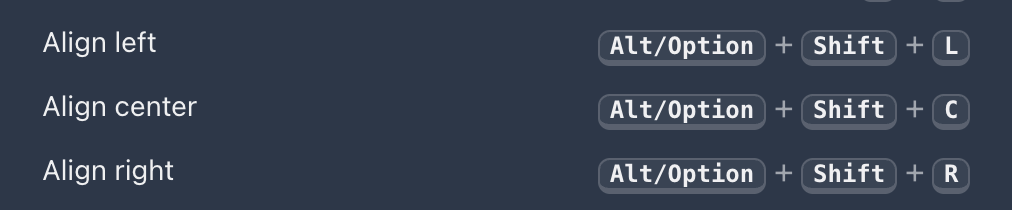
Thank you, Dwight, for your honest feedback. Now you can control text justification via keyboard shortcuts. Please see the screenshot attached for the shortcuts. Hint: You can type /help in the post editor for more shortcuts.
Sai Krishna answered
Superblog Team0
4 Answers
Unfortunately, it’s no longer possible. This is to enforce strict content formatting structure.
Sai Krishna answered
Superblog Team0
I'm sorry to hear that, especially because the change is retro-active and has changed the formatting of my past pages and posts. It is also awkward because call-out buttons are center-justified while text is left-justified, which doesn't always look good on the same page. I would really appreciate if you would consider re-introducing this feature.
Dwight Gingrich answered
0
Thank you, Dwight, for your honest feedback. Now you can control text justification via keyboard shortcuts. Please see the screenshot attached for the shortcuts. Hint: You can type /help in the post editor for more shortcuts.
Sai Krishna answered
Superblog Team0
Thank you! That should work, as long as I remember the shortcut. Thanks for considering my needs.
Dwight Gingrich answered
0
Login to post an answer
or continue with
By continuing, you are agreeing to our terms of service.